
HIPAA-compliant electronic signatures, built into your patient forms.
Gather secure e-signatures across patient intake packets, treatment consents, financial agreements, and records release forms, keeping your entire documentation process fast, paperless, and HIPAA-compliant from the very first visit.
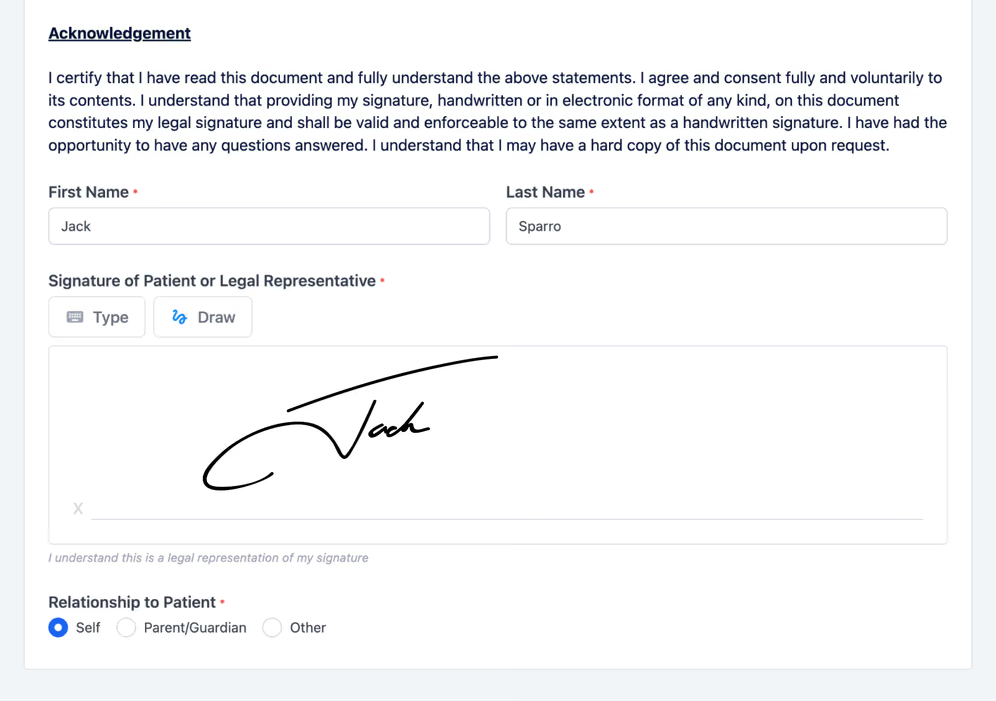
More than a signature box, built for how clinics actually sign.
Signatures inside your intake
Signing isn't a separate DocuSign step; it's built into the same forms patients already complete.
No app to download
Patients sign right in the browser on desktop, tablet, or phone, with nothing to install and no account to create.
Have a PDF instead?
Upload existing PDFs or Word docs and make them signable without rebuilding them.
Signatures are built into your customizable forms and captured on a waiting-room tablet. Popular for consent-heavy dental, mental health, pediatrics, and physical therapy practices.
Secure, paperless form signing for your practice.
Signed before the appointment
Patients sign consents and authorizations from home before they arrive, so check-in isn't held up by unsigned paperwork.
Instant document access
Signed forms are stored automatically and fully searchable in Zentake, so any consent or authorization is a click away when you need it.
Draw or type to sign
Patients sign the way that's easiest on their device, drawing with a finger or mouse, or typing their name, and it's captured as a legally binding signature either way.
Sign from anywhere
Patients sign from home or the waiting room, on a phone, tablet, or computer, whenever it's convenient for them.
Legally binding and built to prove it.
Zentake e-signatures comply with the E-SIGN Act and UETA (legally equivalent to wet signatures) and with HIPAA: encryption in transit and at rest, signer authentication, tamper-evident audit trails, time-stamped tracking, and device authentication, with a signed BAA available. Signed records are stored securely and protected against tampering.

What e-signatures change for your practice.
Faster check-in, shorter waits
Consents and authorizations are signed before patients arrive, so front-desk check-in is a quick hello instead of a stack of forms to sign in the lobby.
Complete paperwork every time
Required signature fields mean consents come back fully signed, so you stop discovering a missing signature days after the visit.
Hours back for your staff
No printing, scanning, filing, or chasing patients for a signature, so your team reclaims time every week for work that matters more.
“Zentake has completely streamlined our workflow. Patients sign legally binding documents right on a tablet: quick, easy, and total confidence in compliance.”
Questions and answers.
Are electronic signatures legally binding in healthcare?
Yes. Under the E-SIGN Act (2000) and UETA (1999), e-signatures carry the same legal weight as handwritten ones, including for patient consents and authorizations.
Is a Zentake e-signature HIPAA compliant?
Yes. Signatures use encryption in transit and at rest, signer authentication, and tamper-evident audit trails, and Zentake aligns with HIPAA, SOC 2, GDPR, and PIPEDA. A BAA is available.
Do patients need an app or account to sign?
No. Patients sign directly in their web browser on any device; there's nothing to download and no account to create.
Where do patients sign?
On any device: desktop, tablet, or smartphone, remotely or on a clinic tablet at check-in.
Do I need to print or scan anything?
No. The entire process is paperless; signed documents are stored securely with an audit trail.
What if I want to sign an existing PDF?
Upload the PDF or Word document, add signature fields, and send it, so patients can sign it without rebuilding it as a form.
Need help setting up? We're here to help.
Reach us by email, phone, or a video call, and we'll get your e-signatures configured whenever you need it.